Phone: (480) 712-8741 Fax: (480) 712-9518

Patient Portal
Patient Portal Instructions
To utilize our Patient Portal simply click the designated button to establish a direct connection. In case you require further guidance, we have included comprehensive instructions for your convenience.

Patient Portal Instructions
MODERN Dermatology’s Patient Portal provides a user-friendly platform for our patients to efficiently manage their health information. From scheduling appointments to reviewing test results and communicating directly with your doctor, this secure online tool offers convenient access to essential healthcare services.
New patients are kindly requested to complete the ‘My Health’ portal questions before their initial appointment. This allows for a more productive discussion with your doctor regarding any issues you may want to address during your visit.
1. Access your email welcoming you to the Patient Portal.
You will receive a welcome email from welcome@practicemailer.com (Patient Portal) once your appointment has been booked.
2. Locate your Username and URL
Upon opening the email, you will find your username (usually your email address) along with the practice URL, which is moderndermaz.modmedapp.com
Under the ‘My Health’ tab, fill out the questions under each catagy on the left panal.
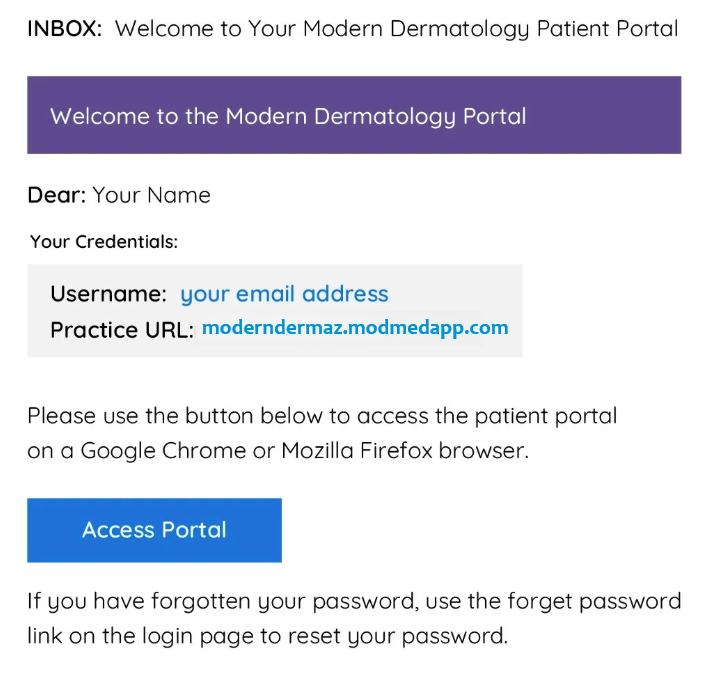
Click on the blue ‘Access Portal’ button in the body of the email:
3. Login to the Patient Portal
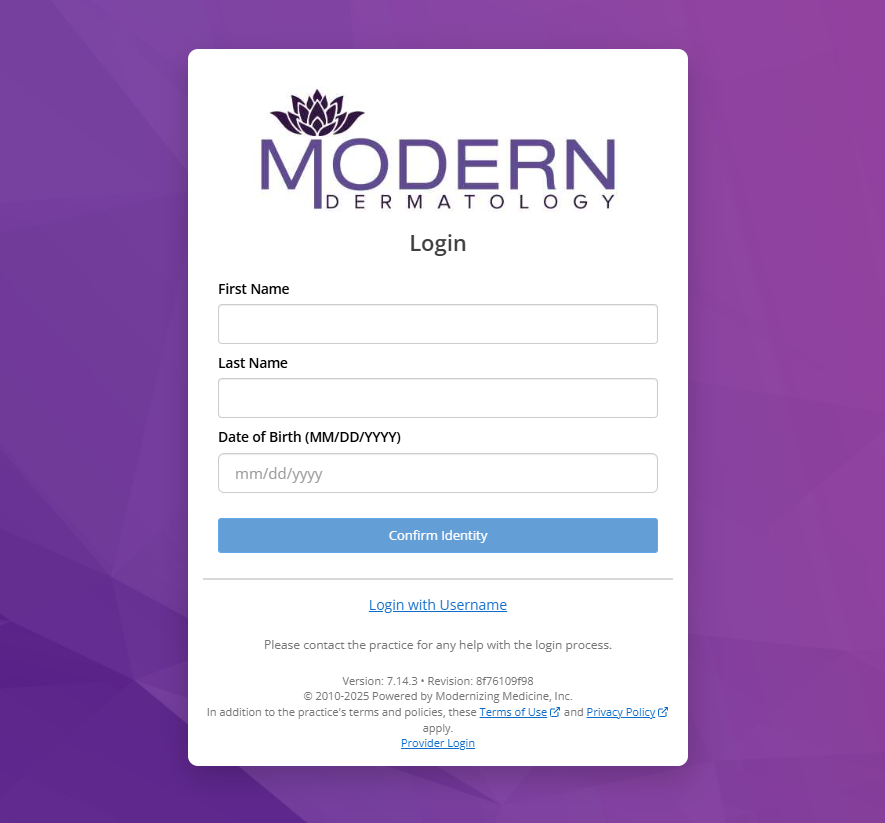
You will be directed to the log in screen (shown below) where you'll need to type in your First Name, Last Name, Date of Birth. Once you've entered your information click Confirm Identity. Another screen will pop up asking you to enter your cell phone and click Send Code to receive a code. Enter the code you receive via text into the new window.
If you do not have a cell phone, you can click Login with Username at the bottom of the Login screen. Your user name is in your email and click forgot password to set a new password.
4. Navigate to the ‘My Health’ Section
When your logged into the Patient Portal, a “Welcome Pop-up” will appear on your screen. Simply close the pop-up by clicking the 'X', then navigate to the 'MY HEALTH' section. On a computer, it is located as the far left option of the navigation bar, while on the app, it is located at the bottom right of your screen.

4. Fill out the Portal Health Questions
Under My Health, please ensure to complete all the categories listed on the left-hand side of the form. Thank you for providing the necessary information to assist with your care.

If you have any inquiries or concerns, feel free to reach out to us by calling 480-712-8741, selecting option 5, or sending us an email at hello@moderndermaz.com.
If you are experiencing difficulty with the portal, please don't worry. You have the option to arrive 30 minutes before your appointment to complete the necessary information on our tablet. Remember to bring along your list of medications to assist in filling out the paperwork.